# The GUI as a text document and a wire
This page describes the three surfaces under the GUI’s panels: the `.rxt` text document, the keyboard and the HTTP routes.
Each exists for the same reason. The GUI is a front end for
the Python API, and none of what it does should be reachable only by pointing at
it.
> **What here is a promise**
>
> The GUI’s HTTP routes are declared provisional; see
> [Provisional by declaration](compatibility.html.md#provisional-by-declaration). They are the surface this page
> describes for the release it ships with, and a route may be added, renamed or
> split in any release. Build programs on the [Python API](api.html.md) instead.
>
> The `.rxt` grammar is normative for the format version it states. The format
> carries its own version number, so a change to it is something a reader can see
> rather than infer.
## The `.rxt` document
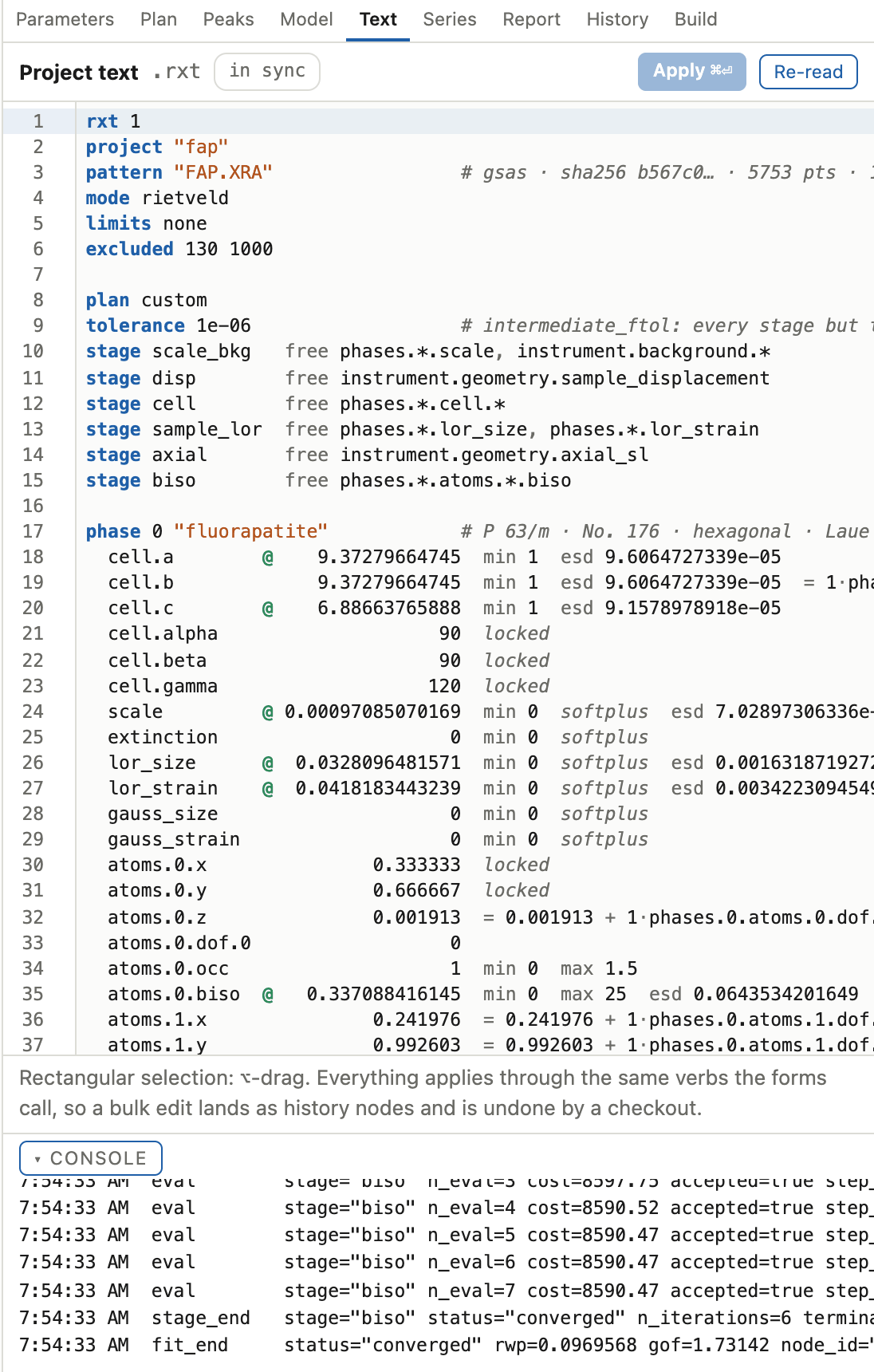
The Text tab renders the whole project as one line-oriented document: the
settings, the plan, and every parameter row. It is the fastest way to change
many things at once, and it is a format you can read.
### The shape of it
```text
rxt 1
project "fap"
pattern "FAP.XRA" # gsas · sha256 b567c0… · 5753 pts · 15–130.04°
mode rietveld
limits none
excluded 129.99 1000
plan custom
tolerance 1e-06 # intermediate_ftol
closing 0.001 # closing_window_tol
stage scale_bkg free phases.*.scale, instrument.background.*
stage cell free phases.*.cell.*
phase 0 "fluorapatite" # P 63/m · No. 176 · hexagonal · Laue 6/m
cell.a 9.3717 min 1
cell.b 9.3717 min 1 = 1·phases.0.cell.a
cell.alpha 90 locked
scale 0.001 min 0
atoms.0.z 0.001913 = 0.001913 + 1·phases.0.atoms.0.dof.0 # Ca1 Ca
instrument
profile.u 0.0002 min -0.05 max 1
background.c0 @ 0
```
### Grammar
The header line is `rxt {{ RXT_FORMAT_VERSION }}` and states the format
version. It is quoted here from the parser itself, so a bump to the format
cannot leave this page behind.
Indentation is the dispatch. A line at column zero opens a block or sets a
document-level key; an indented line is a parameter row inside the block above
it. It is not cosmetic: an indented `plan` line is a parameter named `plan`, and
not the plan block.
Document-level keywords:
| Keyword | Takes |
|---|---|
| `rxt` | the format version, first line |
| `project` | the project name, quoted |
| `pattern` | the data file name, quoted; the comment beside it carries the reader, digest, point count and range |
| `mode` | `rietveld`, `lebail` or `pawley` |
| `limits` | the fitted 2θ range, or `none` |
| `excluded` | one excluded region, low then high; repeatable |
| `plan` | the plan preset name |
| `tolerance` | the intermediate-stage convergence tolerance, or `none` |
| `passes` | the Le Bail cap (`lebail_passes`); written only above 1, and absent means one pass |
| `support` | the absent-phase hold’s threshold in esds (`phase_support_sigma`), or `none` for no significance hold (a phase with no line in range is still held); written only away from 3, and absent means 3 |
| `closing` | the closing stage’s window area fraction (`closing_window_tol`), or `none` for no closing stage; always written, and absent means 1e-3 |
| `stage` | one stage: its name, then `free` and a comma-separated glob list |
| `phase` | opens a phase block: its index, then its name quoted |
| `instrument` | opens the instrument block |
| `peaks` | opens the picked-line block |
| `guard` | a guard setting |
A parameter row is a dot-path, then the value, then any number of modifiers.
They render in this order:
| Modifier | Means | Editable |
|---|---|---|
| `@` before the value | this parameter is free; a bare value holds it | yes |
| the value itself | the parameter’s value | yes |
| `min` / `max` | the bound the solver is given | no; bounds come from the schema rather than from this document |
| `softplus` / `logit` | read only from a document written before 1.8, as the bound it enforced: `min 0`, and `max 1` for `logit` | no; nothing writes it now |
| `locked` | structurally fixed, by symmetry or by a representation that owns the value | no |
| `mode-fixed` | held because the intensity mode holds it; Le Bail and Pawley force-fix every atom parameter, the phase scale and a texture coefficient | no |
| `esd` | the standard uncertainty the last fit produced | no; an esd is a result of a fit and not an input to one |
| `= …` | this parameter is tied, and its value follows the expression | no |
A tie renders last on its line, because the expression contains spaces and runs
to the end of the line.
Column widths are per block and not fixed across the document, which keeps a
narrow value from being padded into its neighbour.
Everything after `#` is a comment. Comments do not survive a re-render: a
document regenerated from the project has one authority, and storing your
comments in the project would make two.
### What is safe to edit
Values render at 12 significant digits, so the document holds
less precision than the project. That is safe, because a typed number is compared against the rendered
value rather than the stored one. Apply an untouched document and it emits no
verbs at all. Only a row whose text you actually changed becomes a call.
Three consequences:
- A read-only field is an error only when it differs. Everything can be shown
without a “look, don’t touch” syntax, because leaving it alone is not an edit.
- Every refusal is the verb’s own words, with a line number attached. It is the
same sentence the form would have given you.
- A glob line is bulk sugar. Writing `profile.* @` frees everything the glob
matches; the next render expands it into one line per parameter.
Applying goes through the same verbs a form calls and records the same history
nodes. There is no merge and no force-apply: if the project moved under your
buffer, re-read and re-apply. Your stale buffer carries the old value of every
row you did not touch, so applying it anyway would silently revert them.
`⌥`-drag is a rectangular selection, and the format aligns its columns for it:
one field down a hundred rows is a column you can select. `⌘⏎` applies.
## The keyboard
Single-key shortcuts fire only when focus is not in a text field, so typing `r`
into the filter box does not start a fit.
| Key | Does |
|---|---|
| `r` | run the fit |
| `.` | run the selected stage |
| `f` / `x` | free / fix the parameters the filter glob matches |
| `/` | focus the parameter filter |
| `p` | the Peaks tab |
| `m` | the Model tab |
| `t` | the Text tab |
| `?` | the Report tab |
| `h` | the History tab |
| `⌘K` / `Ctrl-K` | the command palette |
| `Esc` | close the help popover; otherwise cancel a running fit |
| `⌘⏎` | apply the `.rxt` document, in the Text tab |
`Esc` is handled before the shortcut table, and its two meanings are in that
order deliberately: cancelling a run because a popover happened to be open is
not undone by pressing it again.
## The command palette
`⌘K` is the index of what the app can do, and it is executable. It lists every
command with the Python call it makes:
```text
Run the fit r ref.fit(data, plan=…)
Run one stage — cell . ref.run_stage(stage)
Free the filtered parameters f ref.set_vary(glob, True)
Show the fit report ? ref.report()
Edit the project as text t print(rietx.gui.textdoc.render(project))
```
A command that cannot run right now is shown greyed and sorted last, and never
hidden. So the palette lists everything the app can do, rather than what it can
do at this moment.
The same echo prints in the console when you click a control. Anything you did
by pointing, you can look up as the call that did it. A session of clicking
leaves a console you can read top to bottom as the script you could have
written, and the objects it names are the ones [About a fit](../concepts/fit.html.md) and
[How to branch a refinement, compare the branches and roll back](../guides/branch.html.md) describe.
The transition is meant to be gradual. The project the GUI made is an ordinary
`.rex` directory ([About the project](../concepts/project.html.md)), so open it from Python and the history the GUI
wrote is the history `Refinement.history` gives you.
## The routes
The server is the Python standard library’s `http.server`, bound to `127.0.0.1`. Every response is JSON
except the static files and the two `curves` routes, and every request body is
JSON except the uploads. Mutating routes return 409
while a run is in flight, and that refusal outranks body validation. The
package’s frozen-per-stage rule is enforced structurally rather than by
discipline.
Non-finite floats are spelled as strings (`"Infinity"`, `"-Infinity"`, `"NaN"`)
in responses and event frames alike, because `JSON.parse` rejects the bare
tokens Python writes by default.
The `curves` routes send numbers rather than text. The body is a little-endian
uint32 giving the header’s length, then a JSON header, then the arrays the
header lists, each starting on an 8-byte boundary. Floats are float64 and
indices int32, so a browser reads each array without copying it.
`rietx.viz.packed.unpack` reads one in Python.
### The build, and things that are not a project
| Route | Is |
|---|---|
| `GET /api/capabilities` | what this build can do: backends, solvers, plans, formats, contract versions |
| `GET /api/version` | the package version |
| `GET /api/help` | the help corpus the popovers and the [parameter map](parameters.html.md) are written from |
| `GET /api/spacegroup` | what one symbol constrains; the wizard’s typed-cell step needs it before a project exists |
| `GET /api/settings` · `POST /api/settings` | the person’s own settings, the theme among them, stored beside the recent list rather than in the project; not behind the 409 |
| `GET /api/recent` | the list of recently opened projects |
| `GET /api/fs` | the filesystem browser’s listing, confined to the home directory and the working directory |
| `GET /api/examples` | the example projects shipped in the wheel |
| `POST /api/examples/open` · `POST /api/examples/reset` | build one into the state directory and open it; throw a copy away and rebuild it |
### The project
| Route | Is |
|---|---|
| `POST /api/project/new` · `POST /api/project/open` | create; open, replacing the session’s |
| `GET /api/project` · `POST /api/project` | the project document; a merge into its settings |
| `POST /api/project/save` | write the settings file |
| `GET /api/params` · `PATCH /api/params` | every parameter row; value and vary edits |
| `GET /api/plan` · `PUT /api/plan` · `GET /api/plans` | the plan; replace it; the presets |
| `GET /api/plan/resolve` | the ladder: per stage, what it frees and what stays held |
| `GET /api/structure` · `PATCH /api/structure` | the model, its sites and its symmetry; a whole validated replacement |
| `POST /api/structure/aniso` | switch one atom between isotropic and anisotropic displacement |
| `POST /api/structure/position` | a typed coordinate, projected onto the site’s own directions |
| `GET /api/structure/symmetry` | the Wyckoff letter per atom, which costs a search per atom |
| `POST /api/structure/symmetry/preview` · `POST /api/structure/symmetry` | what a space-group change would invalidate; the change |
| `GET /api/structure3d` | the model as the geometry the 3D view draws |
| `GET /api/instrument` · `PATCH /api/instrument` | the instrument, and edits to it |
| `GET /api/textdoc` · `PUT /api/textdoc` | render the `.rxt` document; apply one |
### Running, and what came back
| Route | Is |
|---|---|
| `POST /api/run` · `POST /api/cancel` · `GET /api/run/state` | start the plan; ask it to stop between iterations; where it is |
| `GET /api/result` | the fit’s numbers, without the curves |
| `GET /api/result/curves` | every channel of the pattern and, after a fit, its curves on the channels it kept |
| `GET /api/report` · `POST /api/report/apply` | the `FitReport`; run the stage one of its suggestions names |
### Peaks and indexing
| Route | Is |
|---|---|
| `GET /api/peaks` · `POST /api/peaks` | the picked list; pick it |
| `POST /api/peaks/add` · `POST /api/peaks/remove` · `POST /api/peaks/move` | one line, added, removed, moved |
| `POST /api/peaks/flag` · `POST /api/peaks/refit` | mark a line; refit its group |
| `POST /api/index` · `GET /api/index/result` | search for a cell; the ranked candidates |
| `GET /api/index/ticks` | one candidate’s predicted lines, for the overlay |
| `POST /api/index/adopt` | adopt a candidate as a Le Bail scaffold |
| `POST /api/index/extinction` · `GET /api/index/extinction` | screen the extinction classes; the answer |
### Series and history
| Route | Is |
|---|---|
| `GET /api/series` · `PUT /api/series` | the staged pattern list; replace it whole |
| `POST /api/series/run` · `GET /api/series/result` | run the chain; its per-pattern answers and trajectories |
| `GET /api/series/curves` · `GET /api/series/history` | one member’s channels and curves, as float64 arrays; one member’s tree |
| `GET /api/history` | the node graph |
| `GET /api/history/diff` · `GET /api/history/compare` | one node against its parent; two nodes against each other |
| `POST /api/history/checkout` · `POST /api/history/branch` | restore a state; fork from one |
| `POST /api/history/tag` · `POST /api/history/annotate` | name a node; attach a note |
### Exports and uploads
| Route | Is |
|---|---|
| `POST /api/export/cif` · `POST /api/export/html` · `POST /api/export/qpa` | the refined structure; the page `rietx html` writes; the phase fractions |
| `POST /api/export/reflections` · `POST /api/export/result_json` | the reflection list; the whole result |
| `POST /api/export/instrument_profile` | the instrument, answered from the project because it needs no result |
| `POST /api/upload/pattern` · `POST /api/upload/cif` · `POST /api/upload/instrument` | the three routes whose body is raw bytes rather than JSON: a file goes up as itself, with its name and reader options in the query string |
| `GET /api/upload/pattern/scans` | what each scan in a multi-scan file is, fetched when the picker is opened |
Uploads are two-phase. A file is staged and read before anything is created, and
only an opaque token crosses back, never a path. So the wizard can show you what
a file contains and what the reader made of it before you commit to a project.
[How to export the refined structure as a CIF and the reflection list as a table](../guides/export.html.md) documents what each export contains; the routes above only choose
where it is written.