A first fit in Python#
This tutorial runs a refinement from Python, from a shipped example project to a two-phase Rietveld fit of synchrotron data.
A fit takes three objects and returns one. You supply a PatternData from
read_pattern, a Structure from a CIF, and an Instrument that describes the
diffractometer. The package returns a RefinementResult.
Throughout this manual, the examples/ scripts, and the API calls the history
prints back at you, rietx is imported as rx.
If you have no data yet#
The package ships 2 example projects. Each is a real specimen with a published reference value, and each carries the refinement protocol its acceptance suite measures, so a fit of one is comparable with a number somebody else recorded.
from rietx.examples import list_examples

for example in list_examples():
    print(f"{example.name:8} {example.title}")
fap      GSAS-II LabData — fluorapatite (lab CuKα doublet)
nac      APS 11-BM — NAC + CaF₂ (synchrotron capillary)
One is an ordinary laboratory pattern, and the other is a synchrotron pattern.
ExampleInfo.description says what each teaches.
rietx.examples.build_example writes one out as a .rex project directory
(About the project) at its starting values. Nothing is fitted. The
refinement is yours to run.
import tempfile

from rietx.examples import build_example

with tempfile.TemporaryDirectory() as parent:
    project = build_example("fap", parent)
    print(project.path.name)
    print(project.doc.mode, len(project.doc.plan.stages), "stages")
    print(len(project.data.two_theta), "points")
fap.rex
rietveld 6 stages
5753 points
In the GUI the same examples are listed on the empty screen, and selecting one opens it. The first open makes your own copy (The GUI: a first fit).
The minimal call#
The files here are the ones the worked example further down uses: an APS 11-BM pattern of Na₂Ca₃Al₂F₁₄ and the COD structure of that phase.
import rietx as rx

data = rx.read_pattern("11BM_NAC.fxye")
structure = rx.Structure.from_cif("cod_1000236.cif")
instrument = rx.Instrument.debye_scherrer(wavelength=0.4139090)

result = rx.refine(data, structure, instrument)
print(result)
print(result), which is str(result), shows what a bare result can say
without the model that produced it. It lists each stage’s status, every
diagnostic and the provenance, with the agreement indices last. An error prints
in full and every other diagnostic on one line, naming the purposes it is a
warning under, because print passes no deliverable.
result.summary(deliverable="qpa") takes one.
RefinementResult: converged (rietveld)
  stage scale_bkg: converged (2 evals, ftol=1e-06)
  ...
  stage closing: converged (4 evals, ftol=solver default), max|Δθ|/esd=0.000
  diagnostics: 1 row, 0 errors; no deliverable given, so none is printed in full
    CAPILLARY_OFFSET_UNAVAILABLE at instrument.geometry.goniometer_radius_mm: info
    pass deliverable= to summary() for the rows that decide your purpose; every row is in result.diagnostics
  provenance: rietx ..., backend=numpy, solver=lm
  Rwp 0.1337 / Rexp 0.0357 (GoF 3.75), Rp 0.0723, χ² 14.0, DW 0.11
RefinementResult.status is a plain string, one of converged, max_iter and
diverged. The second of those means the solver ran out of iterations. It does
not mean the fit failed.
Statistics.rwp is a fraction rather than a percentage. 0.1337 is the Rwp of
13.4 % you would quote in a paper, and every R-factor in the package is stored
this way. On a Refinement session, Refinement.summary() prints more, because
the session holds the compiled model. It adds the report’s account of where the
misfit lies to the same rows.
Agreement statistics defines
each statistic.
One more line draws the fit:
result.plot(path="nac_fit.png", wavelength=0.4139090)
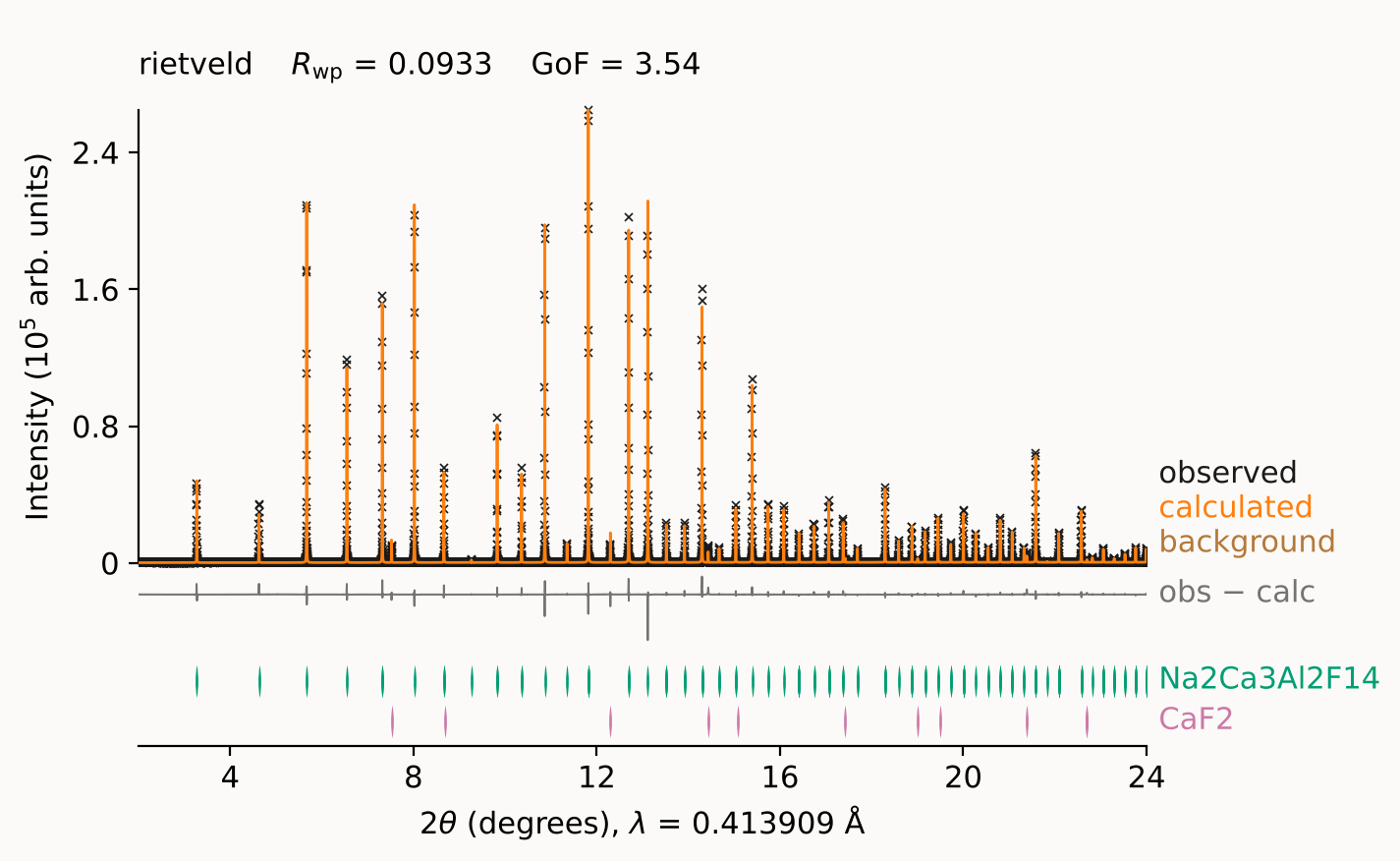
Reading down, the figure shows the observed points, the calculated line, the
obs − calc difference on the same axis at the same scale, then one row of
reflection ticks per phase. The residual sits directly under the peaks that
caused it, and nothing comes between them. Every series is named in the
right-hand margin rather than in a legend the eye has to look up. The fit
statistics sit in the corner, because a figure’s title is its caption.
wavelength= puts λ on the 2θ axis, which is meaningless without it. The other
arguments window the pattern, change the axes and move the residual into a panel
of its own. RefinementResult.plot passes them to rietx.viz.plot_result, whose
arguments API: everyday calls lists.
refine or a Refinement session#
refine runs one fit and discards the session. It is the right call when one
fit is all you need. It keeps no history unless you pass a file path
(history="fit.jsonl"), because a history held in memory would go with the
session.
The object form keeps the session:
ref = rx.Refinement(structure, instrument)
result = ref.fit(data, plan="mccusker_default")
result = ref.fit(data, plan="mccusker_structural")   # continues from the first
Refinement holds the models between calls, so the second fit starts where
the first stopped rather than from the CIF. Three things come with that:
Refinement.fitted_structureandRefinement.fitted_instrumentreturn the models as the last fit left them.Refinement.historyrecords every stage as a node you can go back to, and it is on by default here.Refinement.editputs a change to the model on the same record, so adding a phase is a recorded move rather than a fresh start. How to branch a refinement goes back to a node and forks a new line from it.Refinement.reportbuilds theFitReportwith the compiled model attached.build_reporton a bare result has no compiled model, so its report stops at Layer 0 (About the report).
Reach for the object form as soon as a fit needs a second attempt, which in practice is most of the time.
Le Bail before Rietveld#
Get the peaks into the right places before you ask a structure to explain their intensities.
A Le Bail fit (mode="lebail") refines the cell, the zero shift and the profile
with the intensities extracted per reflection instead of computed from the
structure. It therefore converges from a much worse start, and it tells you
whether the profile is right independently of whether the structure is. Only
then does a Rietveld fit (mode="rietveld", the default) face a fair question.
This is the IUCr guidelines’ own advice for a partial or uncertain model
[McCusker et al., 1999].
There is a second reason to run one. A Le Bail report flags observed peaks the model does not account for, so an impurity phase shows up as unmatched peaks at positions you can identify, before it can distort a structural refinement by being absorbed into a background or a width.
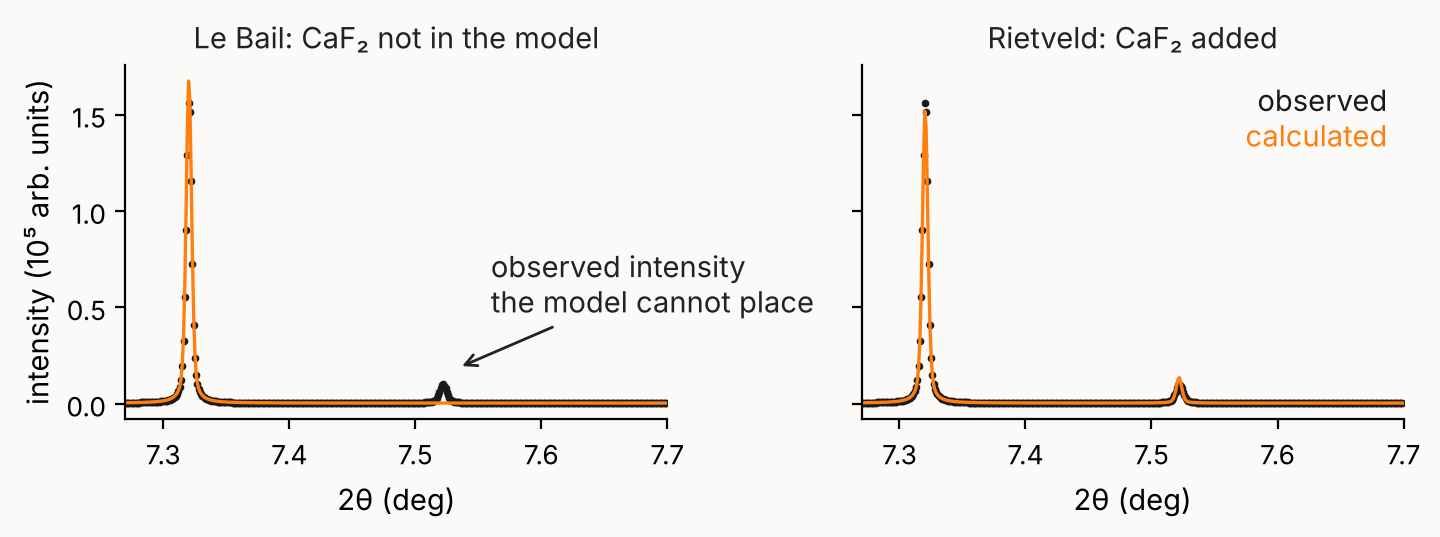
The Le Bail fit knows nothing about CaF₂, so the line at 7.52° is observed intensity the model cannot place, and the report says so. Adding the phase accounts for it.
Only one of those directions carries evidence. A Le Bail intensity is extracted
from the counts in the reflection’s own window, so a reflection the pattern does
not show is assigned almost nothing, and nothing in the report reads the
absence. Reading it takes a count of predicted positions carrying no intensity
above the fitted background. An indexing run’s Le Bail check reports that
count, as LeBailValidation.predicted_but_absent
(INDEX_PREDICTED_BUT_ABSENT).
Texture can empty a reflection the same way, so either one shows up in the
Rietveld fit that follows, where the intensity is computed from the structure.
The cell is on the same footing, and how far depends on how crowded the pattern is. Where reflections are dense, extracted intensities can index one pattern more than one way, so a Le Bail cell that fits better than a structural model does can still be the wrong cell [Peterson, 2005]. Where they are resolved a Le Bail cell is as good as a structural one, and the check is cheap to skip. On the 11-BM LaB₆ pattern, at 0.014 reflections per FWHM, Le Bail, Pawley and Rietveld agree on a to 0.4 ppm with the same esd to 3 %. Reflections per FWHM is the number to look at, and crowding rather than low symmetry is what drives it.
With no structure at all#
A Le Bail fit computes no structure factors, so it does not need a structure.
A space group and a unit cell are enough. In the GUI, step 2 of the new-project
wizard takes either a CIF or a typed cell, and choosing the second sets the mode
to lebail. Type the symbol first. The form then asks for the cell parameters
that symbol leaves free, which for R -3 c is a and c. The rest follow from
the symmetry.
From Python the same scaffold is rietx.schemas.structure.lebail_scaffold,
which takes the symbol and all six cell parameters:
from rietx.schemas.structure import lebail_scaffold

structure = lebail_scaffold("R -3 c", (4.7591, 4.7591, 12.9918, 90, 90, 120))
print(structure.phases[0].space_group, len(structure.phases[0].atoms))
R -3 c 1
The one atom is there because a Phase cannot have an empty atom list. It
contributes nothing, because lebail and pawley mode force-fix every atom
parameter. Refinement.parameters() marks each of them as
ParameterRow.mode_fixed, and
Which parameters refine
gives the other reasons a parameter stays fixed. When you later have a
structure, ref.edit(structure=…) replaces the scaffold, and the mode goes back
to rietveld. Indexing reaches the same scaffold from the other side, when the
cell comes from an indexing run rather than from you.
Not even a cell#
If you do not know the cell either, start from the pattern alone. The wizard’s
third answer to step 2 is None yet, and Project.create takes no structure=
at all:
project = rx.Project.create("unknown.rex", pattern="unknown.xye",
                            instrument=instrument)
That project has zero phases. Peak picking and indexing work over it, which is
how you find the cell. Pick the peaks, index them and adopt a candidate, and the
project becomes a Le Bail one with a scaffold structure.
Tutorial notebook 03 walks that
loop, and the indexing chapter is its theory. Until the
project has a phase, refining it raises NoPhasesError and the GUI’s Run button
is disabled. With no phase there is nothing but the background to fit, and a
plan run over one would converge on the background and report success.
Refinement.predict still works, because evaluating the background as it
stands is not a refinement.
Worked example: a synchrotron pattern with an impurity#
examples/nac_11bm.py refines Na₂Ca₃Al₂F₁₄ against APS 11-BM synchrotron data
in three moves. It runs a Le Bail fit, adds the CaF₂ impurity that the fit’s
report exposes, then runs Rietveld. The test suite runs it on every push.
python examples/nac_11bm.py
pattern: 59498 points, 0.50-59.99 deg, sigma from file: True
phase: Na2Ca3Al2F14, I 21 3, a=10.257 A, 6 asymmetric atoms

Le Bail:  status=converged  Rwp=0.1436  GoF=5.44  a=10.251213 A
Rietveld: status=converged  Rwp=0.0930  GoF=3.53
          a = 10.251216 +/- 0.000039 A (COD reference 10.257(1); high-accuracy powder ~10.2497-10.2506)
          warning[FLOOR_HIT]: phases.1.atoms.0.biso refined to its floor (ρ=+0.188).
            at: phases.1.atoms.0.biso
            help: ...
          info[CAPILLARY_OFFSET_UNAVAILABLE]: ...
It goes on to print the report summary, its five worst regions, and the history tree.
The script is three blocks. First, read the pattern, the structure and the instrument, and set the profile starting values in the right decade for 11-BM’s resolution:
data = rx.read_pattern(DATA / "11BM_NAC.fxye")
print(f"pattern: {len(data.two_theta)} points, "
      f"{data.two_theta[0]:.2f}-{data.two_theta[-1]:.2f} deg, "
      f"sigma from file: {data.sigma is not None}")

structure = rx.Structure.from_cif(str(DATA / "cod_1000236.cif"))
phase = structure.phases[0]
# the CIF names its block after the COD entry; a phase name is what the
# ticks, the diagnostics and the plot gutter are labelled with
phase.name = "Na2Ca3Al2F14"
print(f"phase: {phase.name}, {phase.space_group}, a={phase.cell.a.value} A, "
      f"{len(phase.atoms)} asymmetric atoms")

instrument = rx.Instrument.debye_scherrer(wavelength=WAVELENGTH)
# starting profile guesses in the right decade for 11-BM resolution
instrument.profile.w.value = 2e-5
instrument.profile.x.value = 2e-3
from rietx.schemas.instrument import BackgroundChebyshev
instrument.background = BackgroundChebyshev.with_terms(6)

limits = (2.0, 24.0)
Then the Le Bail fit, which refines the cell and the profile without the structure, and tags the node it reached:
# --- Le Bail first: cell + profile without the structure
# One Refinement carries the whole session; every stage auto-commits a
# node, so `ref.history` ends up holding both refinements and the model
# edit between them.  Pass history="nac.jsonl" to persist it.
ref = rx.Refinement(structure, instrument)
lebail = ref.fit(data, mode="lebail", two_theta_limits=limits)
ref.history.tag(lebail.node_id, "lebail")
a_lb = ref.fitted_structure.phases[0].cell.a.value
print(f"\nLe Bail:  status={lebail.status}  Rwp={lebail.statistics.rwp:.4f}  "
      f"GoF={lebail.statistics.gof:.2f}  a={a_lb:.6f} A")
Then the impurity its report exposed, added as a recorded model edit, and the Rietveld fit that follows with a displacement stage appended to the preset:
# --- Rietveld seeded with the Le Bail cell/profile
# The Le Bail FitReport flags unmatched observed peaks at 7.5, 12.3, 14.4
# and 21.3 deg — exactly the fluorite 111/220/311/422 positions at this
# wavelength: the classic CaF2 impurity in NAC synthesis.  Add it.
structure2 = ref.fitted_structure.model_copy(deep=True)
structure2.phases[0].scale.value = 1e-6
structure2.phases.append(rx.Phase(
    name="CaF2",
    space_group="F m -3 m",
    cell=rx.Cell.cubic(5.4631),
    atoms=[
        rx.Atom(label="Ca", species="Ca2+", x=rx.Parameter(value=0.0),
                y=rx.Parameter(value=0.0), z=rx.Parameter(value=0.0),
                biso=rx.Parameter(value=0.6, min=0.0, max=25.0)),
        rx.Atom(label="F", species="F1-", x=rx.Parameter(value=0.25),
                y=rx.Parameter(value=0.25), z=rx.Parameter(value=0.25),
                biso=rx.Parameter(value=0.9, min=0.0, max=25.0)),
    ],
    scale=rx.Parameter(value=1e-7, min=0.0),
))
# the impurity is a refinement move like any other — record it in the DAG
ref.edit(structure=structure2, label="add CaF2 impurity phase")

plan = rx.RefinementPlan.mccusker_default()
plan.stages.append(rx.Stage("biso", ["phases.*.atoms.*.biso"]))
result = ref.fit(data, plan=plan, two_theta_limits=limits)
a = ref.fitted_structure.phases[0].cell.a.value
a_err = result.parameter("phases.0.cell.a").stderr
print(f"Rietveld: status={result.status}  Rwp={result.statistics.rwp:.4f}  "
      f"GoF={result.statistics.gof:.2f}")
print(f"          a = {a:.6f} +/- {a_err if a_err else float('nan'):.6f} A "
      f"(COD reference 10.257(1); high-accuracy powder ~10.2497-10.2506)")
for d in result.diagnostics:
    print(textwrap.indent(str(d), " " * 10))
The imports, and the main that builds the report and prints the history, are
in the file itself.
Six things in it are moves that any later refinement repeats:
One
Refinementis the session.Refinement.fitcan be called again, and the models carry over.Every stage commits a node.
Refinement.historyholds both refinements and the model edit between them, andRefinementTree.tagnames a node to come back to:t5544a638 15 nodes data=11BM_NAC.fxye n0000 root — n0001 stage:bkg Rwp 3.1772 n0002 stage:zero Rwp 1.0407 n0003 stage:cell Rwp 0.1682 n0004 stage:profile_w Rwp 0.1592 n0005 stage:profile Rwp 0.1435 n0006 stage:closing Rwp 0.1436 [lebail] n0007 edit_model:add CaF2 impurity phase — n0008 stage:scale_bkg Rwp 0.1200 n0009 stage:zero Rwp 0.1200 n0010 stage:cell Rwp 0.0960 n0011 stage:profile_w Rwp 0.0960 n0012 stage:profile Rwp 0.0957 n0013 stage:biso Rwp 0.0933 *n0014 stage:closing Rwp 0.0930
How to branch a refinement works with that record.
A plan is editable.
plan.stages.append(rx.Stage("biso", [...]))adds a displacement stage after the preset’s.Stagetakes parameter names in which*matches any run of characters (phases.*.atoms.*.biso). How to add a stage says how such a name matches, and the parameter map lists every name.RefinementResult.parameterlooks one parameter up by path, with its esd:result.parameter("phases.0.cell.a").stderr.RefinementResult.diagnosticsis the channel for “your answer is wrong although Rwp is fine”. Read it every time. About the report says what a diagnostic carries, and Diagnostic codes lists every code.build_reportturns the result into aFitReport. The report says where the misfit is, what would fix it, and whether the package is confident enough to say so.
The RefinementResult object#
RefinementResult.status says whether the solver converged, and nothing
about whether the fit is any good. A model that matches nothing can converge.
Fit quality is RefinementResult.diagnostics’ channel. RefinementResult.usable
reads the two together, as status == "converged" with no diagnostic at level
"error", which is the test a batch driver wants before it reads a value. A
True there is not a pass. Each warning still names a number you may not quote.
RefinementResult.statistics carries the agreement indices, of which
Statistics.rwp and Statistics.gof are the two usually quoted, and
Statistics.n_points, Statistics.n_free_parameters and
Statistics.esd_inflation are what you need to read them.
The curves are on the result as RefinementResult.y_obs,
RefinementResult.y_calc and RefinementResult.y_background, over
RefinementResult.two_theta. RefinementResult.plot writes an
observed/calculated/difference figure with matplotlib.
The refinement result gives the rest of the
object’s fields. Among them are the structure R-factors
(RefinementResult.phase_agreement) and the counts that say whether the
pattern supported the model (RefinementResult.data_support).
Derived quantities gives the bonding geometry
(RefinementResult.geometry).
Rwp is a fit statistic and not the answer. This package can show you a fit whose Rwp improved while its displacement parameters and phase fractions moved away from the truth. What it hands you instead is the report.
Your own data#
examples/nac_11bm.py builds its structure and instrument in code, which is the
shortest way to show a whole fit. For your own experiment,
API: everyday calls lists the fields of
PatternData, Structure and Instrument, and
Data rietx fits says which
instrument preset matches your diffractometer.
How to calibrate an instrument on a standard and reuse it
measures the instrument once and carries it to each sample.
About the project says how a .rex project keeps your
pattern file, its settings and its history.